

How it works
- A router agent receives the request
- An LLM decides which specialist to delegate to (persisted as a durable step)
- The specialist agent processes the request
- The router returns the result
Example: routing to specialist agents
Define specialist agents within the same process. The LLM picks the right one, and Restate ensures the decision sticks. Vercel AI
 OpenAI Agents
- Google ADK
- Pydantic AI
- LangChain
- Restate TS
- Restate Py
With the Vercel AI, specialist agents are exposed as tools. The LLM decides which tool to call, and Restate durably persists the routing decision.
multi-agent.ts
async function runEligibilityAgent(model: LanguageModel, claim: InsuranceClaim){
  const { text } = await generateText({
    model,
    system:
        "Decide whether the following claim is eligible for reimbursement." +
        "Respond with eligible if it's a medical claim, and not eligible otherwise.",
    prompt: JSON.stringify(claim),
  });
  return text;
}

async function runFraudAgent(model: LanguageModel, claim: InsuranceClaim){
  const { text } = await generateText({
    model,
    system:
        "Decide whether the claim is fraudulent." +
        "Always respond with low risk, medium risk, or high risk.",
    prompt: JSON.stringify(claim),
  });
  return text;
}

const run = async (ctx: restate.Context, claim: ClaimInput) => {
  const model = wrapLanguageModel({
    model: openai("gpt-5.4"),
    middleware: durableCalls(ctx, { maxRetryAttempts: 3 }),
  });

  const { text } = await generateText({
    model,
    prompt: `Claim: ${JSON.stringify(claim)}`,
    system:
      "Analyze the insurance claim and use your tools to decide whether to approve.",
    tools: {
      analyzeEligibility: tool({
        description: "Analyze claim eligibility.",
        inputSchema: InsuranceClaimSchema,
        execute: async (claim: InsuranceClaim) => runEligibilityAgent(model, claim),
      }),
      analyzeFraud: tool({
        description: "Analyze probability of fraud.",
        inputSchema: InsuranceClaimSchema,
        execute: async (claim: InsuranceClaim) => runFraudAgent(model, claim),
      }),
    },
    stopWhen: [stepCountIs(10)],
    providerOptions: { openai: { parallelToolCalls: false } },
  });

  return text;
};
Try out multi-agent systems
Try out multi-agent systems
Install Restate and launch it:Get the example:Export your OpenAI API key and run the agent:Register the agents with Restate:Start a request for a claim that needs to be analyzed by multiple agents:In the UI, in the LLM responses, you can see that the agent called the sub-agents via tools.
npm install --global @restatedev/restate-server@latest @restatedev/restate@latest
restate-server
restate example typescript-vercel-ai-tour-of-agents && cd typescript-vercel-ai-tour-of-agents
npm install
export OPENAI_API_KEY=sk-...
npx tsx ./src/multi-agent.ts
restate deployments register http://localhost:9080 --force --yes # dev only: overrides previous registrations
curl localhost:8080/restate/call/MultiAgentClaimApproval/run --json '{
    "date":"2024-10-01",
    "category":"orthopedic",
    "reason":"hospital bill for a broken leg",
    "amount":3000,
    "placeOfService":"General Hospital"
}'
With the OpenAI Agents, you use
handoffs for in-process agent delegation with automatic context sharing. The intake agent routes to the right specialist based on the claim type.You can use Virtual Object state to remember the last agent that handled a request, so the user can reconnect seamlessly on the next interaction.multi_agent.py
medical_agent = Agent(
    name="MedicalSpecialist",
    handoff_description="I handle medical insurance claims from intake to final decision.",
    instructions="Review medical claims for coverage and necessity. Approve/deny up to $50,000.",
)

car_agent = Agent(
    name="CarSpecialist",
    handoff_description="I handle car insurance claims from intake to final decision.",
    instructions="Assess car claims for liability and damage. Approve/deny up to $25,000.",
)


intake_agent = Agent(
    name="IntakeAgent",
    instructions="Route insurance claims to the appropriate specialist",
    handoffs=[medical_agent, car_agent],
)

agent_dict = {
    "IntakeAgent": intake_agent,
    "MedicalSpecialist": medical_agent,
    "CarSpecialist": car_agent,
}

agent_service = restate.VirtualObject("MultiAgentClaimApproval")


@agent_service.handler()
async def run(ctx: restate.ObjectContext, claim: InsuranceClaim) -> str:
    # Store context in Restate's key-value store
    last_agent_name = await ctx.get("last_agent_name", type_hint=str) or "IntakeAgent"
    last_agent = agent_dict.get(last_agent_name, intake_agent)

    result = await DurableRunner.run(
        last_agent, f"Claim: {claim.model_dump_json()}", session=RestateSession()
    )

    ctx.set("last_agent_name", result.last_agent.name)
    return result.final_output
Try out multi-agent systems
Try out multi-agent systems
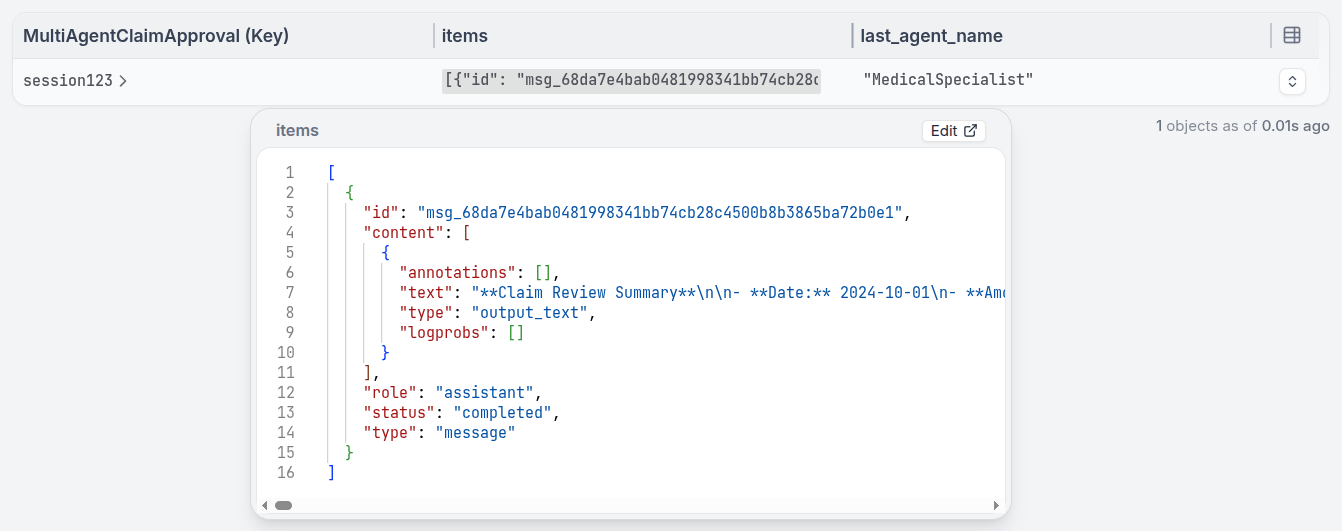
Install Restate and launch it:Get the example:Export your OpenAI API key and run the agent:Register the agents with Restate:Start a request for a claim that needs to be analyzed by multiple agents:In the UI, you can see that the agent called the sub-agents and is waiting for their responses.Once all sub-agents return, the main agent continues and makes a decision.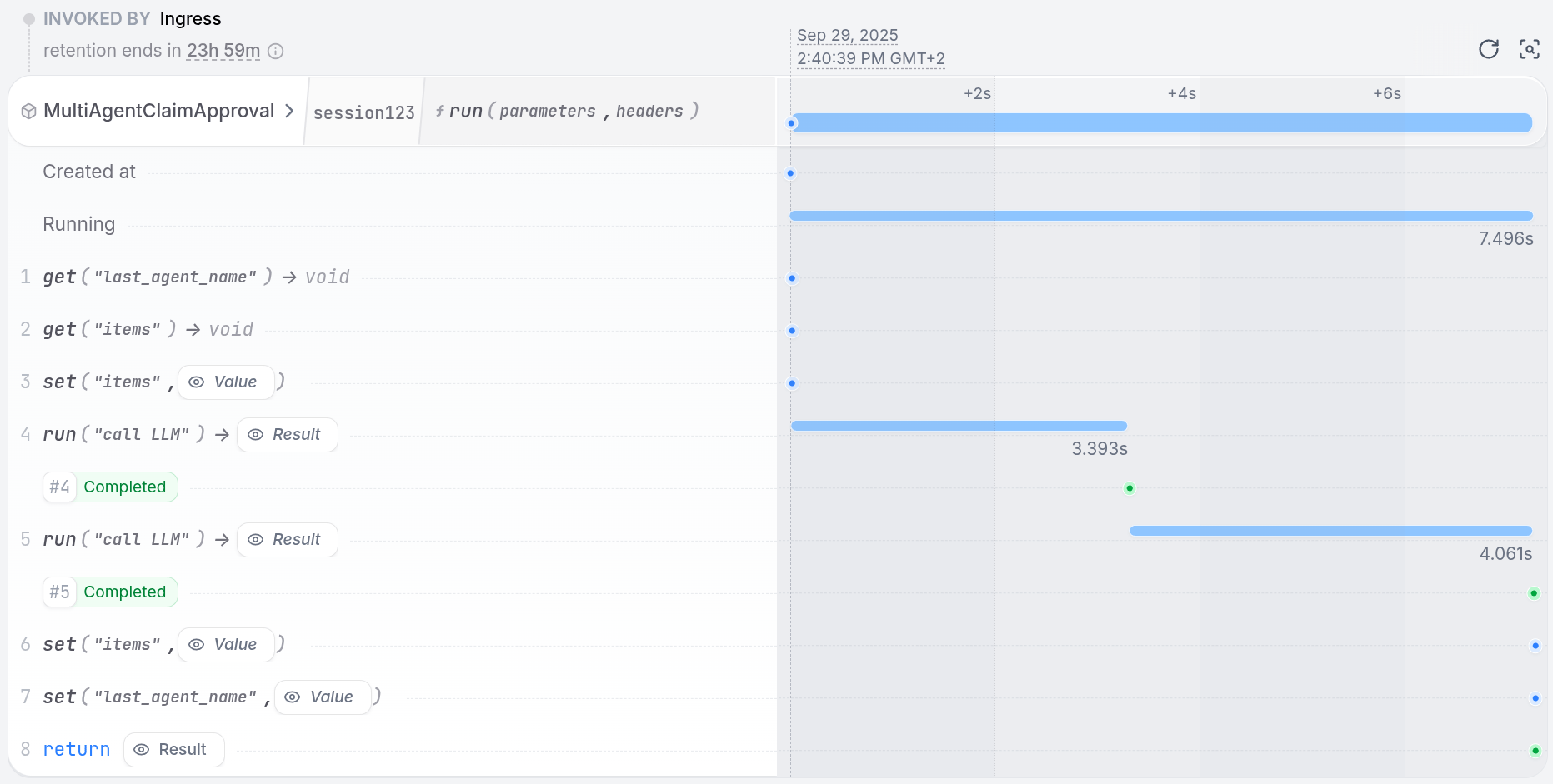
restate-server
restate example python-openai-agents-tour-of-agents && cd python-openai-agents-tour-of-agents
export OPENAI_API_KEY=sk-...
uv run app/multi_agent.py
restate deployments register http://localhost:9080 --force --yes # dev only: overrides previous registrations
curl localhost:8080/restate/call/MultiAgentClaimApproval/session123/run --json '{
    "date":"2024-10-01",
    "category":"orthopedic",
    "reason":"hospital bill for a broken leg",
    "amount":3000,
    "placeOfService":"General Hospital"
}'
With the Google ADK, you use
sub_agents for agent routing within the same app. The intake agent delegates to the right specialist based on the claim type.multi_agent.py
# AGENTS
# Determine which specialist to use based on claim type
medical_agent = Agent(
    model="gemini-2.5-flash",
    name="medical_specialist",
    description="Reviews medical insurance claims for coverage and necessity.",
    instruction="Review medical claims for coverage and necessity. Approve/deny up to $50,000.",
)

car_agent = Agent(
    model="gemini-2.5-flash",
    name="car_specialist",
    description="Assesses car insurance claims for liability and damage.",
    instruction="Assess car claims for liability and damage. Approve/deny up to $25,000.",
)

agent = Agent(
    model="gemini-2.5-flash",
    name="intake_agent",
    instruction="Route insurance claims to the appropriate specialist",
    sub_agents=[car_agent, medical_agent],
)

# Enables retries and recovery for model calls and tool executions
app = App(name=APP_NAME, root_agent=agent, plugins=[RestatePlugin()])
runner = Runner(app=app, session_service=RestateSessionService())

agent_service = restate.VirtualObject("MultiAgentClaimApproval")


@agent_service.handler()
async def run(ctx: restate.ObjectContext, claim: InsuranceClaim) -> str | None:
    events = runner.run_async(
        user_id=ctx.key(),
        session_id=claim.session_id,
        new_message=Content(
            role="user",
            parts=[Part.from_text(text=f"Claim: {claim.model_dump_json()}")],
        ),
    )
    return await parse_agent_response(events)
Try out multi-agent systems
Try out multi-agent systems
Install Restate and launch it:Get the example:Export your Google API key and run the agent:Register the agents with Restate:Start a request for a claim that needs to be analyzed by multiple agents:In the UI, you can see that the agent called the sub-agents and is waiting for their responses.Once all sub-agents return, the main agent continues and makes a decision.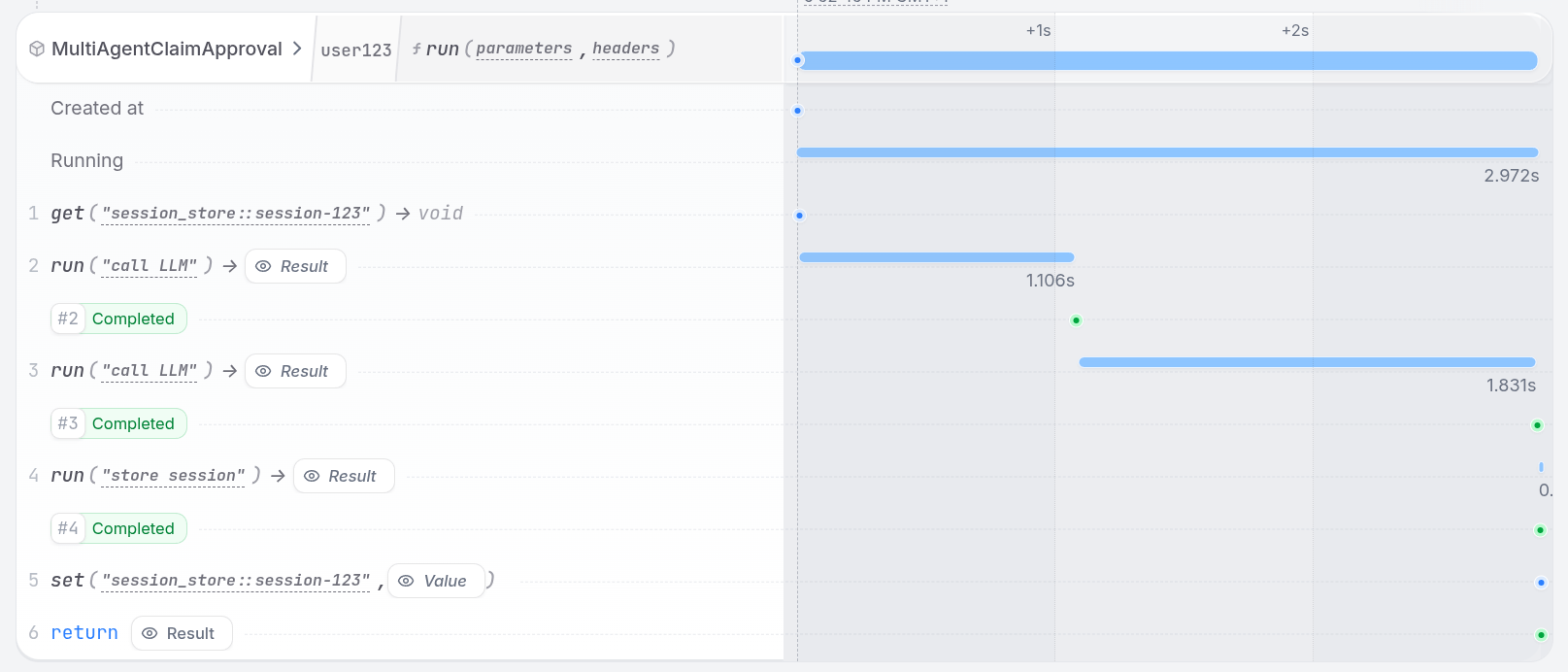
restate-server
restate example python-google-adk-tour-of-agents && cd python-google-adk-tour-of-agents
export GOOGLE_API_KEY=your-api-key
uv run app/multi_agent.py
restate deployments register http://localhost:9080 --force --yes # dev only: overrides previous registrations
curl localhost:8080/restate/call/MultiAgentClaimApproval/user123/run --json '{
    "amount": 3000,
    "category": "orthopedic",
    "date": "2024-10-01",
    "placeOfService": "General Hospital",
    "reason": "hospital bill for a broken leg",
    "sessionId": "session-123"
}'
With Pydantic AI, specialist agents are wrapped in
RestateAgent and exposed as tools on the intake agent. The intake agent uses tool calls to route to the right specialist based on the claim type, and Restate durably persists the routing decision.multi_agent.py
medical_agent = Agent(
    "openai:gpt-5.4",
    system_prompt="Review medical claims for coverage and necessity. Approve/deny up to $50,000.",
)
restate_medical_agent = RestateAgent(medical_agent)

car_agent = Agent(
    "openai:gpt-5.4",
    system_prompt="Assess car claims for liability and damage. Approve/deny up to $25,000.",
)
restate_car_agent = RestateAgent(car_agent)

intake_agent = Agent(
    "openai:gpt-5.4",
    system_prompt="Route insurance claims to the appropriate specialist using the available tools.",
)


@intake_agent.tool
async def consult_medical_specialist(
    _run_ctx: RunContext[None], claim: InsuranceClaim
) -> str:
    """Route to the medical specialist for medical insurance claims."""
    result = await restate_medical_agent.run(claim.model_dump_json())
    return result.output


@intake_agent.tool
async def consult_car_specialist(
    _run_ctx: RunContext[None], claim: InsuranceClaim
) -> str:
    """Route to the car specialist for car insurance claims."""
    result = await restate_car_agent.run(claim.model_dump_json())
    return result.output


restate_intake_agent = RestateAgent(intake_agent)
agent_service = restate.Service("MultiAgentClaimApproval")


@agent_service.handler()
async def run(_ctx: restate.ObjectContext, claim: InsuranceClaim) -> str:
    result = await restate_intake_agent.run(f"Claim: {claim.model_dump_json()}")
    return result.output
Try out multi-agent systems
Try out multi-agent systems
Install Restate and launch it:Get the example:Export your OpenAI API key and run the agent:Register the agents with Restate:Start a request for a claim that needs to be analyzed by multiple agents:In the UI, you can see that the agent called the sub-agents and is waiting for their responses.Once all sub-agents return, the main agent continues and makes a decision.
restate-server
restate example python-pydantic-ai-tour-of-agents && cd python-pydantic-ai-tour-of-agents
export OPENAI_API_KEY=sk-...
uv run app/multi_agent.py
restate deployments register http://localhost:9080 --force --yes # dev only: overrides previous registrations
curl localhost:8080/restate/call/MultiAgentClaimApproval/run --json '{
    "date":"2024-10-01",
    "category":"orthopedic",
    "reason":"hospital bill for a broken leg",
    "amount":3000,
    "placeOfService":"General Hospital"
}'
LangChain’s
create_agent doesn’t ship a first-class handoff primitive, but the pattern is expressed cleanly by exposing each specialist as a tool on the intake agent. The intake agent picks which specialist to invoke; each specialist call is a normal LangChain agent run, fully durable through Restate’s middleware.Conversation history (and which specialist most recently handled a claim) is stored in a Virtual Object so subsequent calls with the same key remember prior context.multi_agent.py
medical_agent = create_agent(
    model=init_chat_model("openai:gpt-5.4"),
    system_prompt=(
        "You are a medical insurance specialist. Review medical claims for "
        "coverage and necessity. Approve/deny up to $50,000."
    ),
    middleware=[RestateMiddleware()],
)

car_agent = create_agent(
    model=init_chat_model("openai:gpt-5.4"),
    system_prompt=(
        "You are a car insurance specialist. Assess car claims for liability "
        "and damage. Approve/deny up to $25,000."
    ),
    middleware=[RestateMiddleware()],
)


@tool
async def to_medical_specialist(claim_json: str) -> str:
    """Hand the claim to the medical specialist for evaluation."""
    result = await medical_agent.ainvoke({"messages": claim_json})
    return result["messages"][-1].content


@tool
async def to_car_specialist(claim_json: str) -> str:
    """Hand the claim to the car specialist for evaluation."""
    result = await car_agent.ainvoke({"messages": claim_json})
    return result["messages"][-1].content


intake_agent = create_agent(
    model=init_chat_model("openai:gpt-5.4"),
    tools=[to_medical_specialist, to_car_specialist],
    system_prompt=(
        "You are an intake agent. Route insurance claims to the appropriate "
        "specialist. Always call exactly one specialist tool, then summarize "
        "their decision."
    ),
    middleware=[RestateMiddleware()],
)


agent_service = restate.VirtualObject("MultiAgentClaimApproval")


@agent_service.handler()
async def run(ctx: restate.ObjectContext, claim: InsuranceClaim) -> str:
    history = await ctx.get("messages", type_hint=ChatHistory) or ChatHistory()
    history.messages.append(HumanMessage(content=f"Claim: {claim.model_dump_json()}"))

    result = await intake_agent.ainvoke({"messages": history.messages})

    ctx.set("messages", ChatHistory(messages=result["messages"]))
    return result["messages"][-1].content
Try out multi-agent systems
Try out multi-agent systems
Install Restate and launch it:Get the example:Export your OpenAI API key and run the agent:Register the agents with Restate:Start a request for a claim that needs to be analyzed by multiple agents:In the UI, you can see that the intake agent called a specialist tool and is waiting for the response.Once the specialist returns, the intake agent continues and summarizes the decision.
restate-server
restate example python-langchain-tour-of-agents && cd python-langchain-tour-of-agents
export OPENAI_API_KEY=sk-...
uv run app/multi_agent.py
restate deployments register http://localhost:9080 --force --yes # dev only: overrides previous registrations
curl localhost:8080/restate/call/MultiAgentClaimApproval/session123/run --json '{
    "date":"2024-10-01",
    "category":"orthopedic",
    "reason":"hospital bill for a broken leg",
    "amount":3000,
    "placeOfService":"General Hospital"
}'
With the Restate SDK, you implement routing by having the LLM pick a specialist (exposed as tools), then calling the LLM again with the specialist’s prompt. Both the routing decision and the specialist call are durable steps.
multi-agent.ts
const SPECIALISTS = {
  billingAgent: {
    description: "Expert in payments, charges, and refunds",
    prompt:
      "You are a billing support agent specializing in payments, charges, and refunds.",
  },
  accountAgent: {
    description: "Expert in login issues and security",
    prompt:
      "You are an account support agent specializing in login issues and security.",
  },
  productAgent: {
    description: "Expert in features and how-to guides",
    prompt:
      "You are a product support agent specializing in features and how-to guides.",
  },
} as const;

type Specialist = keyof typeof SPECIALISTS;

async function answer(ctx: Context, { message }: { message: string }) {
  // 1. First, decide if a specialist is needed
  const routingDecision = await ctx.run(
    "Pick specialist",
    // Use your preferred LLM SDK here - specify agents as tools
    async () => llmCall(message, createTools(SPECIALISTS)),
    { maxRetryAttempts: 3 },
  );

  // 2. No specialist needed? Give a general answer
  if (!routingDecision.toolCalls || routingDecision.toolCalls.length === 0) {
    return routingDecision.text;
  }

  // 3. Get the specialist's name
  const specialist = routingDecision.toolCalls[0].toolName as Specialist;

  // 4. Ask the specialist to answer
  const { text } = await ctx.run(
    `Ask ${specialist}`,
    async () =>
      llmCall([
        { role: "user", content: message },
        { role: "system", content: SPECIALISTS[specialist].prompt },
      ]),
    { maxRetryAttempts: 3 },
  );

  return text;
}
Try out multi-agent systems
Try out multi-agent systems
Install Restate and launch it:Get the example:Export your API key:Register the services with Restate:Send a request:
restate-server
restate example typescript-restate-tour-of-agents && cd typescript-restate-tour-of-agents
npm install
export OPENAI_API_KEY=sk-...
npx tsx ./src/multi-agent.ts
restate deployments register http://localhost:9080 --force --yes # dev only: overrides previous registrations
curl localhost:8080/restate/call/AgentRouter/answer \
  --json '{"message": "I was charged twice for my subscription last month"}'
With the Restate SDK, you implement routing by having the LLM pick a specialist (exposed as tools), then calling the LLM again with the specialist’s prompt. Both the routing decision and the specialist call are durable steps.
multi_agent.py
# Create the routing service
router = restate.Service("AgentRouter")

# Our team of AI specialists
SPECIALISTS = {
    "BillingAgent": "Expert in payments, charges, and refunds",
    "AccountAgent": "Expert in login issues and security",
    "ProductAgent": "Expert in features and how-to guides",
}


@router.handler()
async def answer(ctx: restate.Context, question: Question) -> str | None:
    """Classify request and route to appropriate specialized agent."""

    # 1. First, decide if a specialist is needed
    routing_decision = await ctx.run_typed(
        "Pick specialist",
        llm_call,  # Use your preferred LLM SDK here
        RunOptions(max_attempts=3),
        messages=f"""You are a customer service routing system.
        Choose the appropriate specialist, or respond directly if no specialist is needed.
        {question.message}""",
        tools=[tool(name=name, description=desc) for name, desc in SPECIALISTS.items()],
    )

    # 2. No specialist needed? Give a general answer
    if not routing_decision.tool_calls:
        return routing_decision.content

    # 3. Get the specialist's name
    specialist = routing_decision.tool_calls[0].function.name or "ProductAgent"

    # 4. Ask the specialist to answer
    response = await ctx.run_typed(
        f"Ask {specialist}",
        llm_call,
        RunOptions(max_attempts=3),
        messages=f"""You are a {SPECIALISTS.get(specialist)} specialist."
        Answer the question: {question.message}""",
    )

    return response.content
Try out multi-agent systems
Try out multi-agent systems
Install Restate and launch it:Get the example:Export your API key:Register the services with Restate:Send a request:
restate-server
restate example python-restate-tour-of-agents && cd python-restate-tour-of-agents
export OPENAI_API_KEY=sk-...
uv run app/multi_agent.py
restate deployments register http://localhost:9080 --force --yes # dev only: overrides previous registrations
curl localhost:8080/restate/call/AgentRouter/answer \
  --json '{"message": "I was charged twice for my subscription last month"}'